|
|
MapleSEA Episode 2更新(game client patch v0.95-Crimsonwoodkeep Pq and more!)
 [复制链接]
|
|
|
 发表于 21-10-2009 06:58 PM
|
显示全部楼层
发表于 21-10-2009 06:58 PM
|
显示全部楼层
原帖由 yuyike5303 于 21-10-2009 06:10 PM 发表 
Summoning Skill Bug
----------------------------------------------------------------------------------------------------------------------------------------------------------------------------------- ...
什么来的?? |
|
|
|
|
|
|
|
|
|
|
|
发表于 21-10-2009 09:29 PM
|
显示全部楼层
|
|
|
|
|
|
|
|
|
|
|
发表于 21-10-2009 10:50 PM
|
显示全部楼层
如果只是弄给Flame wizard就好(大部分都是Hacker ) ) |
|
|
|
|
|
|
|
|
|
|
|
发表于 22-10-2009 01:13 AM
|
显示全部楼层
坏消息
jq 的reward pink bean set 才一个月 |
|
|
|
|
|
|
|
|
|
|
|
发表于 22-10-2009 10:49 AM
|
显示全部楼层
回复 1290# yuyike5303 的帖子
|
什么jq有pink bean set? |
|
|
|
|
|
|
|
|
|
|
|
发表于 22-10-2009 06:04 PM
|
显示全部楼层
回复 1291# 靓坤 的帖子
hat 和 overall  |
|
|
|
|
|
|
|
|
|
|
|
发表于 23-10-2009 10:00 AM
|
显示全部楼层
|
|
|
|
|
|
|
|
|
|
|
发表于 23-10-2009 09:30 PM
|
显示全部楼层
|
|
|
|
|
|
|
|
|
|
|
发表于 23-10-2009 09:30 PM
|
显示全部楼层
|
你要的是这个吧? |
|
|
|
|
|
|
|
|
|
|
|
发表于 24-10-2009 06:36 PM
|
显示全部楼层
为什么我进不到maple是server check 吗??
我一按sg我就逃出来key error! |
|
|
|
|
|
|
|
|
|
|
|
发表于 28-10-2009 07:11 PM
|
显示全部楼层
Disconnection issues after v0.83 Patch
----------------------------------------------------------------------------------------------------------------------------------------------------------------------------------------------------------------------------------------------------------------------
Hi hi,
Asiasoft has been notified of the frequent disconnection issue while connecting to the game after the patch today. For us to identify the root of the problem, we will need you to provide us with the following information.
ISP : Maxis / Celcom / Streamyx / Starhub / Singtel / PenangFon
Speed :
Country : SG / MY / others
State :
City :
Share connection with how many PC :
Wired / Wireless :
Lag while playing which gateway :
Game World you are playing :
[ Update ]
Computer Operating System : Windows XP / Windows Vista / Windows 7 / Others
IMPT: Please follow the steps in http://maple.playpark.net/notices/vi...ection_issues/ to assist us further.
Thank you. |
|
|
|
|
|
|
|
|
|
|
|
发表于 28-10-2009 07:12 PM
|
显示全部楼层
Fishing King Event Winners
----------------------------------------------------------------------------------------------------------------------------------------------------------------------------------------------------------------------------------------------------------------------
Dear Maplers,
We are pleased to inform you the Winners for our Fishing King Event.
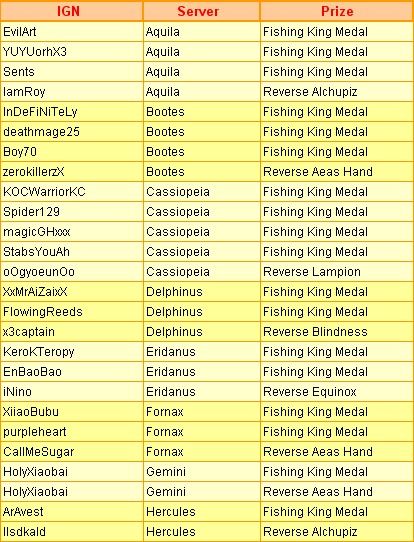
All winners will receive the prize(s) after the next server patch which will be scheduled on the 3rd November 2009. Congratulations to all winners and Happy Mapling!
For more information, please visit here.
– MapleSEA Administrator |
|
|
|
|
|
|
|
|
|
|
|
发表于 28-10-2009 07:13 PM
|
显示全部楼层
Game Client Patch and Cash Shop Update on 28/10
----------------------------------------------------------------------------------------------------------------------------------------------------------------------------------------------------------------------------------------------------------------------
Dear Maplers,
Please be informed that there will be a Game Client Patch and Cash Shop Update on the 28th October 2009, 0800hrs to 1130hrs (+8 GMT). The Game Service will be down during this period. Please logout before this time to avoid any loss of items.
Kindly refer to here for more information on the version 0.83 game contents.
[ Game ]
Launching of Maple Trading System (MTS)
[ Cash Shop Update ]
• [Equip] Cute Mousey Ears
• [Equip] GD Shades
• [Equip] Lolli Pink Suit
• [Equip] Blanc Rose Top
• [Equip] Blue Ribbon Pants
• [Equip] Bling Bling Shoes
• [Equip] Starry Starry Ring
• [Equip] White Monkey Balloon
• [Equip] Halloween Teddy
• [Etc] Return of Angel
[Update]
• Game Client Patch and Cash Shop Update will be extended for 1hr - from 0800hrs to 1230hrs (+8 GMT) instead of 0800hrs to 1130hrs (+8 GMT).
• Game Service for MY Gateway has resumed service at 1220hrs (+8 GMT).
• Game Service for SG Gateway has resumed service at 1255hrs (+8 GMT).
• Maple Trading System for SG Gateway is available since 1410hrs (+8 GMT).
We are sorry for any inconveniences caused. Thank you for your understanding and patience.
- MapleSEA Administrator |
|
|
|
|
|
|
|
|
|
|
|
发表于 28-10-2009 07:14 PM
|
显示全部楼层
Patch Notes for Version 0.83 [Update on MTS]
----------------------------------------------------------------------------------------------------------------------------------------------------------------------------------------------------------------------------------------------------------------------
Dear Maplers,
The upcoming Version 0.83 patch includes:
[Game]
Launching of Maple Trading System! (MTS for SG Gateway is Available NOW!)
The MTS system is designed to enable all users to make safe transactions with items, using the currency of Cash across Worlds within the same Gateway.
How to enter the MTS:
Upon clicking the “Trade” button located at the bottom right of the screen, users will enter a zone similar to Cash Shop.
Items for Purchase:
Under the “For Sale” tab, a list of purchasable items will be shown. All items listed there are put up for sale by the other players.
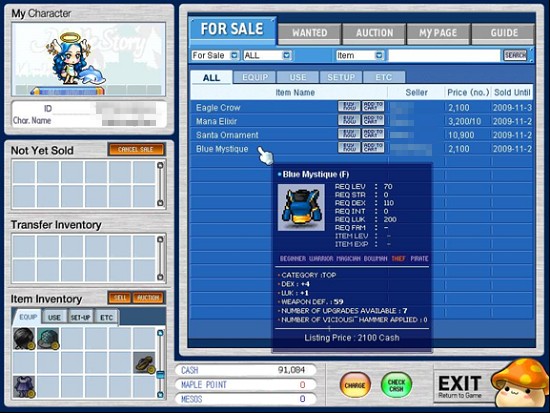
User may browse through the pages and tabs slowly, to look for the item(s) which he wants. If the user has a specific item in mind, he may type the item name onto the blank field and click “Search.”
The “Search” function will then proceed to display only a list of the same item which the user is looking for. If the item is not found in the MTS, nothing will be displayed.
Players may then compare the prices and stats of the items, by moving the cursor over them before making the purchase.
How to Purchase:
The user may make purchases simply by clicking onto the “Buy Now” button. The item will then be shown in the “Transfer Inventory” column. Double click the item, to transfer it into your inventory.
If the user is considering on making a few purchases, he may click onto the “Add to Cart” button for all the considered items. The items will then be shown on the “My Page” tab and he will be able to keep track of the items which he is interested in.
To purchase, click onto the “Buy” button. Please note that the cart will not be emptied out when you log out of the game. Hence, click onto the “Cancel” button to delete the item(s) off your Cart.
How to Sell:
After entering the MTS zone, simply select the item for sale as shown in your “Item Inventory” and click “Sell.” You will be asked to key in the “Listing Price” and the number of units. (Minimum “Listing Price” is 110 Cash) Then, the “Total price” will be automatically generated.
Please note that the “Total Price” is calculated according to the following formula: 1,000 cash + 10% of the item price. The buyer of the item will have to bear this full cost, which is inclusive of a transaction fee.
There will also be a standardized 5,000 Mesos “Listing fee,” which the seller has to fork out in order to put up an item for sale.
After an item is sold, the seller will only receive the amount of Cash according to the “Listing Price” which he has keyed in, instead of the “Total Price” shown.
Do also note that each seller must be over Level 10, in order to put up his item(s) for sale in the MTS. All items will be put up for sale, until the seller has decided to “Cancel Sale.”
To do so, he may select the item in the “Not Yet Sold” column and click onto the “Cancel Sale” button. After which, the item will be reflected in the “Transfer Inventory” column instead. Double click on it to have it be returned to your own inventory.
“Wanted” Items:
If the user is not able to find a specific item in the MTS, he may choose to notify other players that he’s looking for the item by clicking onto the “List Wanted Item” button.
Type the keyword of the item onto the search field and click “search,” to find the item you wish to list out as “Wanted.” Double click on the name and fill in the “Total Price” and number of units. (Minimum “Total Price” is 1,001 Cash) User may also type in a short message below, for the others to view. For user who wants to list out their “Wanted” item, he must have sufficient Cash that is equivalent to the “Total Price”. MTS will deduct the Cash amount which is similar to the “Total Price” when you listed out in the “ List Wanted Item”. If you decide to remove your “Wanted” Item, the “Total Price” amount will be return to you.
Interested sellers will be able to send their preferred price to the buyer, by clicking onto the “Send an Offer” button.
Items for Auction:
To put up an item for auction, select the item in your “Item Inventory” and click on “Auction.” The user will be asked to fill in the number of hours the auction will run for, the “Starting Bid,” the “Bid Increment” and the “Direct Purchase Price.”
Please note that the number of hours must range from 24 hours ~ 168 hours. (Maximum of 7 days) The “Starting Bid” price must also be lower than the “Direct Purchase” price.
Items which have been put up for auction and have a minimum of at least one bid will not be able to be pulled out of the sale. Only items with no bids will be able to be pulled out from sale.
After 7 days, if the item(s) remains unsold it will be moved to the “Not Yet Sold” tab, where players will be able to retrieve their item(s).
To bid for an item, proceed to the “Auction” tab and click on “Place Bid.” The minimum bid increment will be fixed by the seller beforehand. Click on the up and down arrows, to increase or decrease your bid increment. When you bid for an item, your Cash amount will be deducted. When another user bid higher than you, the amount you have placed for the bid will be returned to you.
If the user would like to purchase the item straight, it can be done so by clicking on the “Buy Now” button.
Registration fee and 10 percent tax for Maple Trading System is not applicable from 28th Oct 2009 to 3rd Nov 2009. Registration fee and 10 percent tax will apply after the server check on 3rd Nov 2009.
So what are you waiting for? Use the Maple Trading System today!
Please be informed that MTS for MY Gateway will be made available on a later date. Do keep a lookout for more information on MapleSEA website on the implementation of MTS in MY Gateway.
[Cash Shop Update]
• [Equip] Cute Mousey Ears
• [Equip] GD Shades
• [Equip]Lolli Pink Suit
• [Equip] Blanc Rose Top
• [Equip] Blue Ribbon Pants
• [Equip] Bling Bling Shoes
• [Equip] Starry Starry Ring
• [Equip] White Monkey Balloon
• [Equip] Halloween Teddy
• [Etc] Return of Angel
- MapleSEA Administrator |
|
|
|
|
|
|
|
|
|
|
|
发表于 28-10-2009 08:32 PM
|
显示全部楼层
有没有得下载呢?
玩不到 |
|
|
|
|
|
|
|
|
|
|
|
发表于 28-10-2009 09:38 PM
|
显示全部楼层
|
|
|
|
|
|
|
|
|
|
|
发表于 28-10-2009 10:06 PM
|
显示全部楼层
|
现在还不得玩? |
|
|
|
|
|
|
|
|
|
|
|
发表于 28-10-2009 10:55 PM
|
显示全部楼层
|
|
|
|
|
|
|
|
|
|
|
发表于 29-10-2009 12:46 AM
|
显示全部楼层
Dear Maplers,
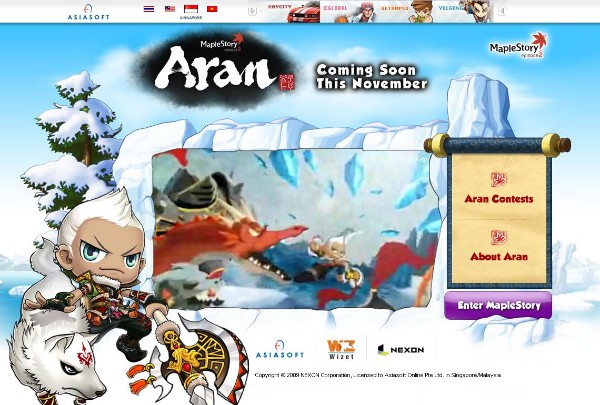
We are pleased to announce that the MapleSEA Aran site has been launched! Read more about the pole arm using Hero, Aran and discover why Lirin lives with so many penguins.
MapleSEA Aran Site
What’s more, the Ranking System has returned! Find out where you stand when compared to all the other players in MapleSEA now!
- MapleSEA Administrator |
|
|
|
|
|
|
|
|
|
|
|
发表于 29-10-2009 08:45 AM
|
显示全部楼层
|
又有人要被狂hack了 |
|
|
|
|
|
|
|
|
|
| |
 本周最热论坛帖子 本周最热论坛帖子
|














 939
939  83
83


