|
|
家庭影院電腦(HTPC),爆米花Popcorn Hours A110播放机,轻松自载下载盒...
 [复制链接]
|
|
|
 发表于 15-10-2009 08:47 PM
|
显示全部楼层
发表于 15-10-2009 08:47 PM
|
显示全部楼层
大家要行动啊,空说是不会有成果滴。。。我换了一本咯 |
|
|
|
|
|
|
|
|
|
|
|
发表于 15-10-2009 10:24 PM
|
显示全部楼层
我也想要~ 有谁可以跟我交换下? 有谁可以跟我交换下? |
|
|
|
|
|
|
|
|
|
|
|
发表于 17-10-2009 09:31 AM
|
显示全部楼层
puchong/cheras 区的请pm我下。。。
不过现在final,等11月中先 |
|
|
|
|
|
|
|
|
|
|
|

楼主 |
发表于 17-10-2009 11:53 AM
|
显示全部楼层
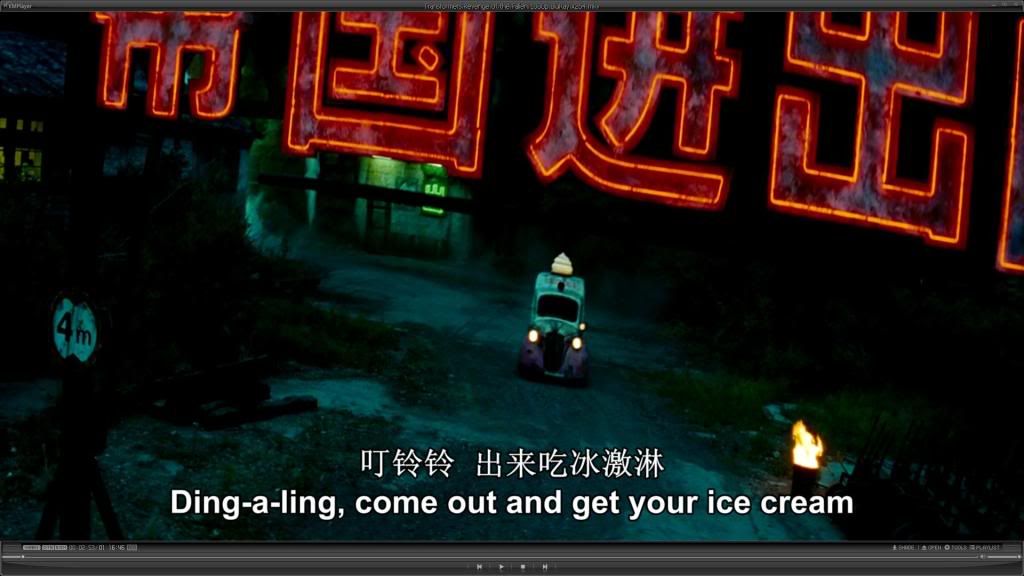
Transformers: Revenge of the Fallen蓝光碟应该需要等到20号才开始出售。
为什么网上早已能找到1080p版本,真奇怪究竟哪里来的影片源?
 |
|
|
|
|
|
|
|
|
|
|
|
发表于 17-10-2009 04:59 PM
|
显示全部楼层
|
|
|
|
|
|
|
|
|
|
|
发表于 17-10-2009 05:01 PM
|
显示全部楼层
原帖由 李秋陈 于 17-10-2009 11:53 AM 发表 
Transformers: Revenge of the Fallen蓝光碟应该需要等到20号才开始出售。
为什么网上早已能找到1080p版本,真奇怪究竟哪里来的影片源?
楼主,外国好像有了。
我记得amazon好像有得买了的...
还是说那是pre-order?
EDIT:不好意思,刚去看了,证实是pre-order。 30NOV才会有
[ 本帖最后由 Sim 于 17-10-2009 05:04 PM 编辑 ] |
|
|
|
|
|
|
|
|
|
|
|
发表于 17-10-2009 10:55 PM
|
显示全部楼层
原帖由 李秋陈 于 17-10-2009 11:53 AM 发表 
Transformers: Revenge of the Fallen蓝光碟应该需要等到20号才开始出售。
为什么网上早已能找到1080p版本,真奇怪究竟哪里来的影片源?
http:// ...
我有这个邮票了,REMUX的 |
|
|
|
|
|
|
|
|
|
|
|
楼主 |
发表于 23-10-2009 12:52 PM
|
显示全部楼层
|
|
|
|
|
|
|
|
|
|
|
发表于 26-10-2009 06:33 PM
|
显示全部楼层
原帖由 李秋陈 于 22-7-2008 12:24 PM 发表
最初预算希望能以RM1K之内打造出这架HTPC,不过最后还是超出了少许预算。所有硬件但不包括光纖线(digital optical audio cable)我共敗了接近RM1200。。。。
可以把价钱写清楚吗。。。。
因为我也想买一架。。。 |
|
|
|
|
|
|
|
|
|
|
|
楼主 |
发表于 27-10-2009 10:02 AM
|
显示全部楼层
|
|
|
|
|
|
|
|
|
|
|
楼主 |
发表于 27-10-2009 10:08 AM
|
显示全部楼层

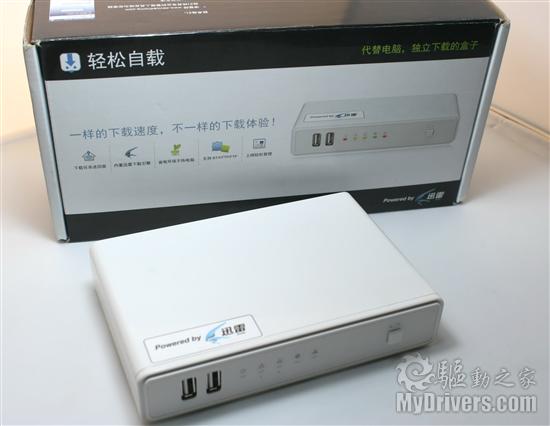
多功能的網路硬碟分享下載器,結合2.5吋行動硬碟或3.5吋外接式硬碟,提供24小時電腦免開機,離線BT下載功能,不僅可降低電腦硬碟毀損的風險,還可達到電力節約效果。內建FTP伺服器、Samba伺服器檔案傳輸功能,支援Media Server與iTunes Server功能,可同時在多台電腦上欣賞音樂、影片,還可連接XBOX 360及PS3等遊戲機等設備。
1).電腦免開機的BitTorrent下載功能,節能防駭,降低個人電腦硬碟損毀風險
2).BitTorrent下載功能,可限制上傳頻寬流量
3).支援一顆2.5吋行動硬碟或3.5吋外接式硬碟,最高容量達1.5TB
4).內建FTP伺服器、Samba伺服器功能,可多台電腦共享檔案資源
5).支援Media Server (XBOX 360、PS3),可分享多媒體檔案
6).支援iTunes Server功能,可同時在多台電腦上欣賞音樂
7).支援英文、繁體中文介面Web管理、可設定管理密碼
8).支援DHCP Client
9).免費韌體升級(Web)

將您所擁有的USB隨身碟, 硬碟外接盒接上本產品, 即成為NAS網路磁碟機,
輕鬆讓你玩NAS不必花大錢!!
可作BT下載伺服器, BT下載再也不用電腦開機, 玩BT不用再管一堆煩人的設定,
可作UPNP媒體伺服器, 讓區域網路裡面的電腦 or PS3遊戲機, 透過網路輕鬆分享照片, 音樂, 影片等媒體檔案,
可作網路芳鄰(SAMBA)伺服器, 建立帳號群組讓區網的電腦都可享有網路儲存空間,
操作介面簡單易操作, 使用網頁瀏覽器即可管理, 支援繁體中文/簡體中文/英文

商品特色:
1. 支持全下載協議,【獨家】支援迅雷下載,與BT、FTP、HTTP,優于同類產品
2. 隨插即用好方便,支援DHCP,免設192.168與任何防火牆設定
3. 免電腦開機下載,省90%以上電力,沒有風扇好安靜
4. 最快的下載盒,Up to 500KBps
5. Web網頁遠端下載,家裡光纖頻寬不浪費能夠在任何一個地方完成文件的存取、添加下載任務,查看下載進度
6. 支援NAS、Samba 網路芳鄰
7. 免刷機,線上韌體更新好輕鬆,即時升級最新下載引擎
8. 支援2.5吋及3.5吋外接硬碟,最高支援1000G!
9. 支援firefox 3.06以上版本
10.下載任務歲回家時,透過7X24服務,不論你家什麼網路環境,可關閉電腦,無廣告好安全
11.嚴密安全認證,密碼保護順利公司、學校、網咖皆可安全管理,不怕駭客入侵,安全有保護
12.我的電腦及可看到網路芳齡,輕鬆自載內的檔案,輕鬆好方便
13.利用Media Player Classic,即可硬碟不插拔,透過網路芳鄰直接看
14支持BIG5,GB2312,UTF-8等內碼集,全球首款真正完美解決漢字亂碼問題
15使用固件系統,永不感染病毒支持
16 獨有固件智能升級功能,絕不影響硬槃內數據,實現透明升級
17 支持移動硬槃級連:支持自身再擴展外接優槃或移動硬槃
18硬件開關電路獨立設計,輕松應對意外斷電等突發問題,配合斷點續傳完全實現24小時不間斷極速下載
19.SOC硬件電路設計,專有硬碟休眠,節能90%以上,延長硬槃使用壽命
20獨有內部機能檢測的永不死機技術,自動重開,永不死機,真正實現了24小時全天侯工作
有谁在用着这些网络硬盘分享下载器或者是下载盒吗?
小小的盒子具有一些NAS的功能而且价钱大众化,很适合我这种低消费群。
最吸引我的功能是24小时免开电脑BT下载(低耗电,号称能节省90%电费)以及支援Media Server可以分享多媒体檔案。
临时还不懂得它的稳定性以及速度如何,假如都不赖它将会是购买NAS的另一个好选择。 |
|
|
|
|
|
|
|
|
|
|
|
发表于 27-10-2009 10:32 AM
|
显示全部楼层
看到这个帖,真的好开心..
终于找到有大大分享他的HTPC经验了..
小弟我最近刚组装新的CPU,也打算把它打造成一台HTPC(看高清电影,听歌和打机)…
基本上CPU已经成形了..不过不清楚SPEC适不适合拿来当HTPC,就要大大帮我看下..
AMD PhenomII X4 810 2.60GHZ
Gigabyte M770-UD3P mobo
Corsair 1333MHZ DDR3 2X2GB
Sapphire ATI Radeon HD5850 1GB
CM Real Power Pro 650W
CM Gladiator 600 Chasis
Win7 RC
Chasis是满大的,看起来满碍眼..不过无所谓啦..呵呵..
至于TV 和音响还在物色着..可能会选择42”plasma还是37” full HD lcd…
音响方面就没有头绪..
有几个问题想请问你们..
以我的spec来看..我的5850是有HDMI的..所以说我只要准备一条HDMI cable,然后连接5850去TV,画面的部分就搞定了,是吗?HDMI cable有quality之分吗?好的价钱介于多少??
至于音效方面..小弟我没有入手sound card..而只是用onboard 的7.1 sound..Spec 大概是这样:
1. Realtek ALC888 codec
2. High Definition Audio
3. 2/4/5.1/7.1-channel
4. Support for S/PDIF In/Out
5. Support for CD In
母板上有一个 coaxial S/PDIF Out connector 和一个 optical S/PDIF Out connector..请问该用哪个来连接音响?
[img]  [/img] [/img]
这样的一条cable,是不是就搞定了声效的部分(可以support 5.1/7.1声效)??还是还需要其它的cable?
那天在C4看到这副philips HTS3366/98,假如一这副为标准的话..是不是可以用coaxial S/PDIF 来连接?
[img] http://images.philips.com/is/ima ... 30&hei=430&$jpglarge$[/img]
http://www.consumer.philips.com/ ... -hts3366_98/prd/my/
Rear Connections: HDMI output, Component Video output, S-Video out, Composite video (CVBS) output, AUX in, FM Antenna, Easy-Fit speaker connectors, Digital coaxial in..
(它的HDMI out是不是可以接去TV?这样的话是不是说除了可以从HTPC看DVD,也可以从这副philips HTS3366/98直接来play dvd disc??)
看到LZ大大加个TV card来control..可不可以大概解释一下它的作用??装了有什么优势??因为看了不是很明白..谢谢.. |
|
|
|
|
|
|
|
|
|
|
|
楼主 |
发表于 27-10-2009 02:06 PM
|
显示全部楼层
回复 192# 车痴 的帖子
你可以这样接
PC (HD5850) --- HDMI cable ---> LCD tv (HDMI Input 1)
PC (coaxial S/PDIF out) --- coaxial cable ---> Philip HTS 3366/98 (Digital coaxial in)
Philip HTS 3366/98 (HDMI out) --- HDMI cable ---> LCD tv (HDMI Input 2)
或者是
PC (HD5850) –-- HDMI cable ---> HDMI Amplifier –-- HDMI cable ---> LCDtv
如果我没有错,S/PDIF不足够传送7.1声效。
你提到的Philip HTS3366/98只拥有Digital coaxial in,而且应该只是5.1家庭剧场系统。
Philip HTS3366/98是播放器当然可以播放DVD直接用HDMIcable接到LCDtv。
当时购买电视卡是为了添加一个遥控器, 方便在免键盘和鼠标器下遥控Windows Media Center多媒体功能.
[ 本帖最后由 李秋陈 于 27-10-2009 02:12 PM 编辑 ] |
|
|
|
|
|
|
|
|
|
|
|
发表于 27-10-2009 02:34 PM
|
显示全部楼层
回复 193# 李秋陈 的帖子
谢谢大大的回复…
假如我的音响有Coaxial和optical input的话,用哪个来连接我的母板的音效比较好?
那S/PDIF可以传送多少声道的音效?假如我的on board是7.1,然后音响也是7.1的…那要怎样接?
大大有什么音响组合好介绍的?我不打算买那些有built in dvd player的surround hifi (blu ray的太贵)..价钱在1500里面的..
我是看上了一台philips blu ray player..RM599..
打算blu ray – hifi – tv,然后HTPC-hifi-tv..两个同时连接..做的到吗?
那是不是说我的hifi (amp)要有两个input,一个给HTPC,一个给blu ray player??
会不会很多余?? |
|
|
|
|
|
|
|
|
|
|
|
发表于 27-10-2009 03:03 PM
|
显示全部楼层
回复 194# 车痴 的帖子
我刚看了philips的hts specs - 好象只是DTS, Dolby Digital, Dolby Prologic II, Stereo - 为什么没有看到HDSMA和DDTrueHD 啊?
至于哪个onboard的7.1卡 - spdf的频宽只能support到5.1而已。如果要7.1,一定要用hdmi了。
其实不用那么麻烦。买个可以通过usb来播放external media的蓝光机就可以了。你说的哪个philips的应该是BDP3000。那是个好机。画质好。但是他的usb只是拿来用BD live的,不能播放media files。samsung有个BDP1600(A),可以拿来放mkv。只是贵过philips一点而已。也有wireless,不过dongle要另外买。也可以上youtube和其他的media网。sony有个BDP360,也不错。只是没有wireless,应该可以播放mkv(我不是很清楚),不然panasonic有个BDP60在阿妈zon买才US1x0。
有了将的player就不用htpc啦,要看BD或mkv都随你。也省电。 |
|
|
|
|
|
|
|
|
|
|
|
发表于 27-10-2009 03:15 PM
|
显示全部楼层
|
|
|
|
|
|
|
|
|
|
|
楼主 |
发表于 27-10-2009 06:29 PM
|
显示全部楼层
回复 196# 车痴 的帖子
如果5.1你已经觉得是大工程,那为何你还要考虑7.1?
须知7.1的排法是沙发不躺墙壁。。。
假如一定要7.1它必须是从你的HD5850 HDMI输出。。。
不清楚你所谓的surround hifi是什么?
市场上的5.1 Home theater system应该就没有HDMI in。
看你的购物表,又Blu-Ray player,又42'电视机,又声响系统。。。应该是没有最高预算那种。
你应该拿扩大器加喇叭与woofer,这方面这里很多大大可以给你意见。
我个人较喜爱Denon3808但现在应该早已过时,真失败想了一大辈子还是没有能力把它买下。
如果只是纯看高清电影,你可以考虑这个-开博尔BD-200 蓝光播放机蓝光碟硬盘全能王,google一下它的资料。 |
|
|
|
|
|
|
|
|
|
|
|
发表于 28-10-2009 09:34 AM
|
显示全部楼层
回复 197# 李秋陈 的帖子
其实我只打算玩5.1而已…7.1声效是跟着mobo来了..
其实我只是好奇说coaxial/optical不能support 7.1的话..那应该要怎样接?
假如从我的5850 HDMI输出的话..那是要从PC里做设置吗?
其实我也觉得应该拿扩大器加喇叭与woofer,可是我的budget不想放太高..最多1500..所以怕配不到..
而且我对音响也完全没有头绪.所以才会想到拿这种配好的5.1 HTS…
以1500的预算来看.. 扩大器加喇叭和woofer能配到的spec如何?
其实我不完全想看高清电影而已…在TV上玩PC GAME也是我的主要原因之一..
所以还是以HTPC为优先考虑… |
|
|
|
|
|
|
|
|
|
|
|
楼主 |
发表于 3-11-2009 03:47 PM
|
显示全部楼层
回复 198# 车痴 的帖子
小弟暂时没有支援次世代音效輸入的扩大器,对在PC里做7.1设置还是一知半解。
你的HD5850应该是支援多声道及次世代音效的bitstream輸出,很有条件搞7.1。
HD5850 Spec:-
Integrated HD audio controller
Output protected high bit rate 7.1 channel surround sound over HDMI with no additional cables required
Supports AC-3, AAC, Dolby TrueHD and DTS Master Audio formats
无论如何RM1,500的预算,你应该把目标放在家庭剧场系统(HTS)把扩大器临时忘记。 |
|
|
|
|
|
|
|
|
|
|
|
楼主 |
发表于 3-11-2009 03:52 PM
|
显示全部楼层
从网上找到两篇关于音频规格和高清播放机芯片的文章。
希望能解答一些初学者心中的疑问,让大家能真真购买到最适合自己的高清播机。
HD-Audio Explained
When looking at Media player specifications you will find mention of various audio formats. DTS? Dolby True-HD? DTS MA? DTS HR? This page explains what all these acronyms actually mean, as well as listing the Media Players capable of utilising the latest standards. The switch to High Definition content has meant not only a visible change in video quality but also a similar improvement in audio quality. Unfortunately the switch has not been straightforward, with many competing standards with various levels of sound quality. There are two companies who have issued standards for HD-Audio that are in wide use today, Dolby and DTS (Digital Theatre System).
“Lossy Format”
The following formats are all 'lossy'. This means that they use compression methods to make the file size smaller. This results in the audio you hear being of a lesser quality than the studio original. With DVD, this level of compression was neccessary due to the limitations of DVD both in storage size and data throughput.
Dolby Digital (Also known as AC-3) This is a required standard of Blu-Ray and was also a required standard for DVD. It is the most widely supported HD-Audio standard, with all Media Players featured on our site supporting it. Dolby Digital supports audio up to 5.1 channel surround sound and a bit-rate of up to 754 kb/s. It is a 'lossy' compression standard so the audio will sound inferior to the original studio recording.
Dolby Digital can be either be decoded in the Media Player and output digitally as required via HDMI or in analogue via PCM analogue (called 'Downmix' in our site), or the raw digital stream can be bitstreamed direct to a receiver or TV via an Optical (Toslink) or Coaxial SPDIF connector (called 'Pass-through' in our site).
Dolby Digital Plus An anhanced version of Dolby Digital offering higher bit-rates and the possibility for 7.1 surround sound. Optional standard for Blu-Ray players. Although better quality than Dolby Digital, is still a 'lossy' format. Is little used and has largely been passed over in favour of higher quality lossless formats.
DTS (Digital Theatre System) Also a required standard of both Blu-Ray and DVD. Is technically similar to Dolby Digital but widely regarded to produce superior audio quality. Is standardised at a higher bit-rate of 1.5mb/s for Blu-Ray. Many of the 2008/9 Media Players either did not support DTS at all, or if they did, they could not downmix to stereo for typical TV use. Without downmix you would get no audio when playing back DTS files via HDMI to a TV. Many modern HD media files (often .mkv) have the sound encoded using DTS, so DTS downmix is becoming increasingly essential for Media Players. DTS is a 'lossy' compression standard so the audio will sound inferior to the original studio recording.
Like Dolby Digital, DTS can be either be decoded in the Media Player (downmixed) and output digitally as required via HDMI or in analogue via PCM analogue, or the raw digital stream can be bitstreamed direct to a receiver or TV (pass-through) via an Optical (Toslink) or Coaxial SPDIF connector. Most newer Media Players can downmix DTS whilst some older models (notably the WDTV) only support pass-through.
DTS Downmix Media Players
WDTV Live, Eminent EM7075, Tvix 6600, CinemaTube BV-5005HD, IcyBox IB-MP305, ASUS O!Play, Popcorn Hour C-200, M2TV, Mede8er MED500X, Popcorn Hour C-200, Xtreamer, Ellion HMP-500H, I-Box Z400W, Elektron EHP-700, Popcorn Hour A-110, Egreat EG-M34A, Seagate Theater+
• DTS-HD HR (High Resolution) An enhanced version of DTS offering higher bit-rates and better compression. Optional standard for Blu-Ray players. Exists in a core+extension format. Is still a 'lossy' format and is not widely supported, having been largely passed over in favour of lossless formats.
“Lossless” Formats
These formats carry identical representations of the original studio audio. They are made possible by the greater storage capacity and throughput of Blu-Ray and modern disk based media storage methods.
• Dolby TrueHD Lossless compression format giving audio indentical to the original studio recording. Is completely seperate from Dolby Digital AC-3, so files carrying Dolby TrueHD audio must also carry a seperate Dolby Dgital AC-3 track to make them playable on non TrueHD players.
Can either be downmixed in the player to an analogue format if supported, or bitstreamed via HDMI 1.3 or higher to a compatible receiver. Optical or Coaxial SPDIF cannot carry a TrueHD signal owing to the high bitrate. Very few Media Players can downmix Dolby.
Dolby TrueHD Media Players
Pass-through: WDTV Live, Eminent EM7075, Egreat EG-M34A, Popcorn Hour A-110, HDX 1000, SageTV HD, Elektron EHP-700, I-Box Z400W, Netgear Elite 9150, PlayOn!HD, Ellion HMP-500H, Xtreamer, Mede8er MED500X, Popcorn Hour C-200
Downmix: SageTV HD, Netgear Elite 9150, Mede8er MED500X,
• DTS-HD MA (Master Audio) Lossless compression format giving audio indentical to the original studio recording. Unlike Dolby TrueHD, works in a core+extension configuration so players that do not support it can extract the DTS core audio.
Can either be downmixed to an analogue format if supported by the player, or bitsreamed via HDMI 1.3 to a compatible receiver. If DTS-HD MA is not supported then the DTS core should still be extracted. Optical or Coaxial SPDIF cannot carry a DTS-HD MA signal in full quality owing to the high bitrate. At the time of writing, no Media Player can downmix DTS-HD MA audio tracks, with only a few being able to bitstream it.
DTS-HD MA Media Players
Pass-through: WDTV Live, Eminent EM7075, Egreat EG-M34A, Popcorn Hour A-110, HDX 1000, SageTV HD, Elektron EHP-700, Netgear Elite 9150, PlayOn!HD, Ellion HMP-500H, Xtreamer, Popcorn Hour C-200
Downmix: |
|
|
|
|
|
|
|
|
|
| |
 本周最热论坛帖子 本周最热论坛帖子
|












 2826
2826  51
51


